Understand what computer memory is and why it is needed.
Learn the two main types of memory: RAM and ROM.
Understand the difference between RAM (temporary) and ROM (permanent).
Know the difference between memory and storage.
Learn the units of memory: Byte, KB, MB, GB with real-life comparisons.
Understand internal storage vs external storage with examples.
📖 Let Us Begin!
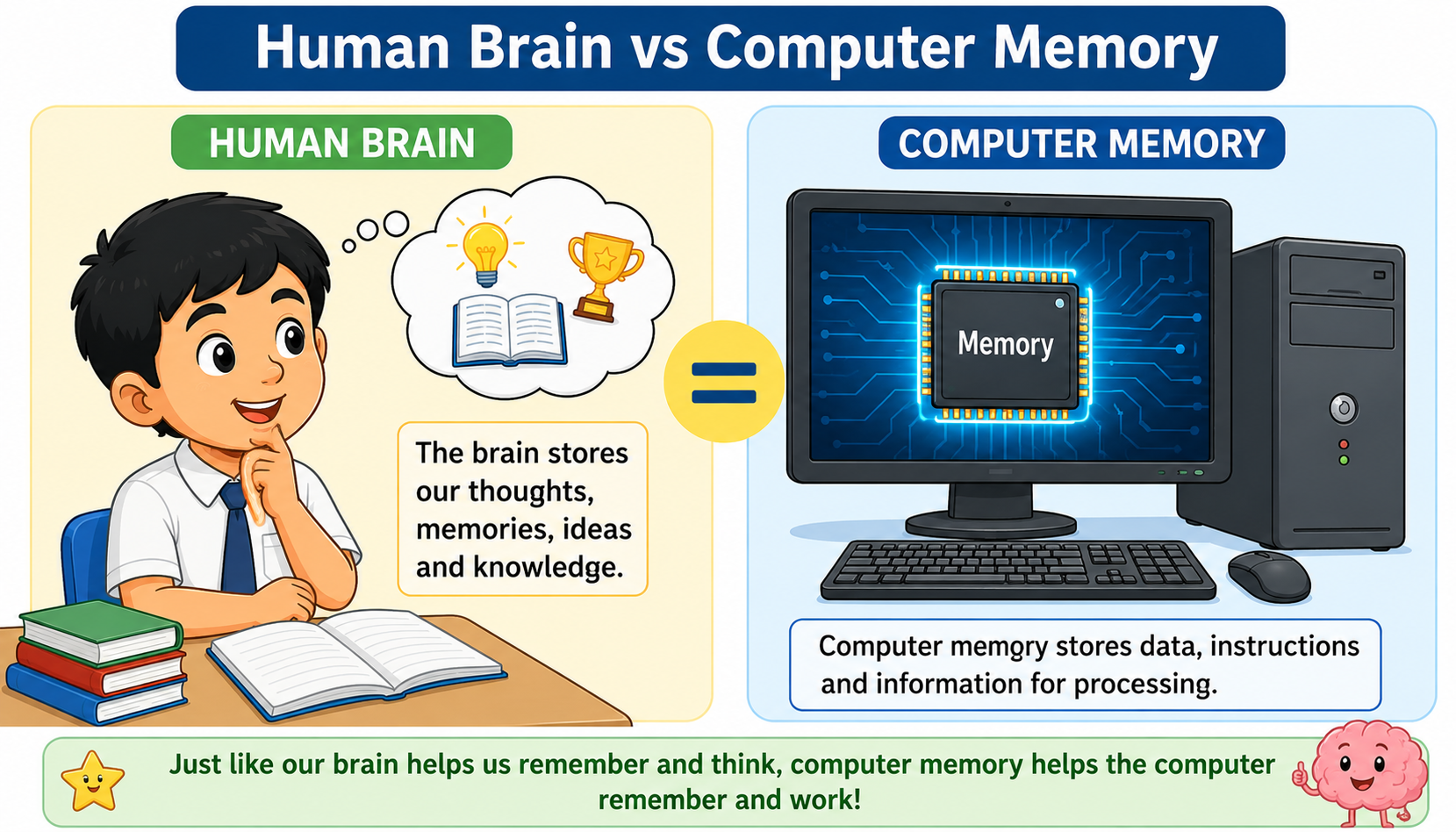
When Ravi does his homework, he remembers the answers in his brain. But sometimes he writes important things in his notebook so he doesn't forget them later. A computer also needs to remember things! The part of the computer that remembers information is called computer memory.
Just like our brain helps us think and remember, computer memory helps the computer store and recall data. Without memory, a computer cannot work at all — it would forget everything instantly!
What is Computer Memory?
Computer memory is the space inside a computer where it keeps data and instructions. Think of it like a notebook where the computer writes down everything it needs to remember.
Think about it: When you solve a maths problem, your brain holds the numbers while you calculate. Similarly, computer memory holds data while the computer is working on it!
Memory helps the computer to:
Store the programs (apps) that are running.
Remember the data you are working on (like a document or a game).
Keep important instructions that tell the computer how to start.
Save files like photos, songs, and videos for later use.
Types of Computer Memory
A computer has two main types of memory:
1. RAM (Random Access Memory)
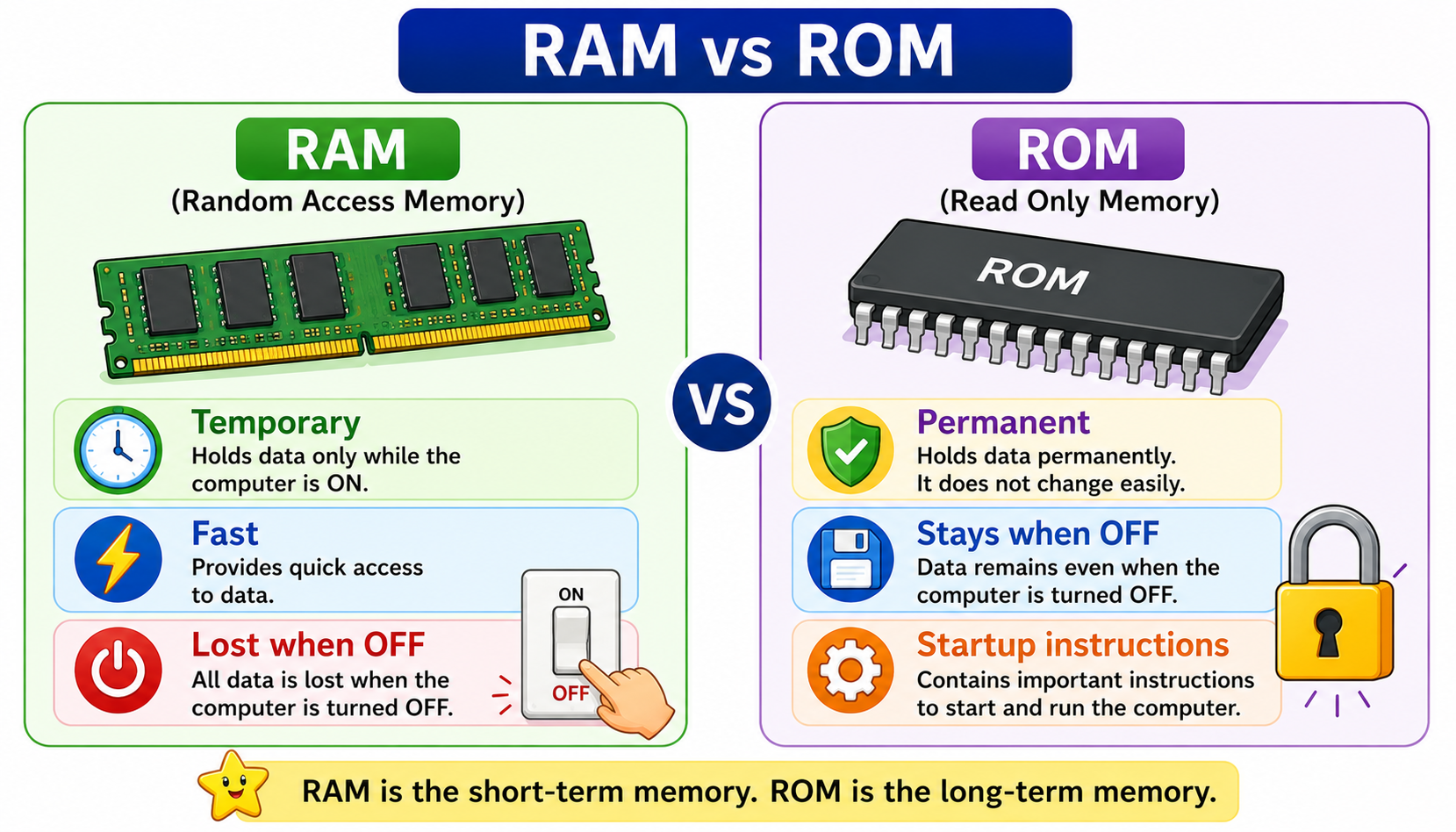
RAM is the computer's short-term memory. It remembers things only while the computer is switched ON. The moment you turn off the computer, everything in RAM is erased — just like when you wake up and forget your dream!
RAM is temporary — data is lost when the computer is turned off.
RAM is very fast — it helps the computer work quickly.
RAM stores the programs and files you are currently using.
More RAM means the computer can run more programs at the same time.
Example
When Meena opens a drawing app on the computer, the app is loaded into RAM. While she draws, all her work is in RAM. If the power goes off suddenly before she saves, her drawing is lost! That's because RAM forgets everything when the power is gone.
2. ROM (Read Only Memory)
ROM is the computer's permanent memory. The data stored in ROM stays even when the computer is turned off. It contains special instructions that tell the computer how to start up.
ROM is permanent — data stays even when the computer is off.
ROM can only be read, not easily changed or written to.
ROM stores the startup instructions (called BIOS) for the computer.
ROM is slower than RAM but never loses its data.
Example
When Ravi presses the power button on his computer, the computer knows what to do — it shows the logo, checks all parts, and loads the operating system. These startup instructions are stored in ROM. Even if the computer was off for months, ROM still remembers them!
Feature
RAM
ROM
Full Form
Random Access Memory
Read Only Memory
Type
Temporary (volatile)
Permanent (non-volatile)
When power is OFF
Data is lost
Data stays
Speed
Very fast
Slower than RAM
Can we change data?
Yes, easily
No, it is read-only
What it stores
Programs and files currently in use
Startup instructions (BIOS)
Real-life comparison
Like a whiteboard — write and erase
Like a printed book — cannot change
Easy way to remember: RAM is like a whiteboard in your classroom — the teacher writes on it and erases it every day. ROM is like a printed textbook — the words stay forever and cannot be erased!
Storage vs Memory — What's the Difference?
Many people confuse memory and storage, but they are different!
Memory (RAM)
Storage (Hard Disk / SSD)
Short-term — holds data while computer is ON
Long-term — keeps data even when computer is OFF
Very fast
Slower than RAM
Small capacity (4 GB, 8 GB)
Large capacity (256 GB, 500 GB, 1 TB)
Like your brain's working memory
Like your notebook or diary
Think of it this way
Memory (RAM) is like your study table — you keep the books you are reading RIGHT NOW on it. It has limited space.
Storage (Hard Disk) is like your bookshelf — it holds ALL your books, even the ones you are not reading today. It has much more space.
When Meena wants to read a book, she takes it from the bookshelf (storage) and puts it on her table (memory). When she is done, she puts it back on the shelf.
Units of Computer Memory
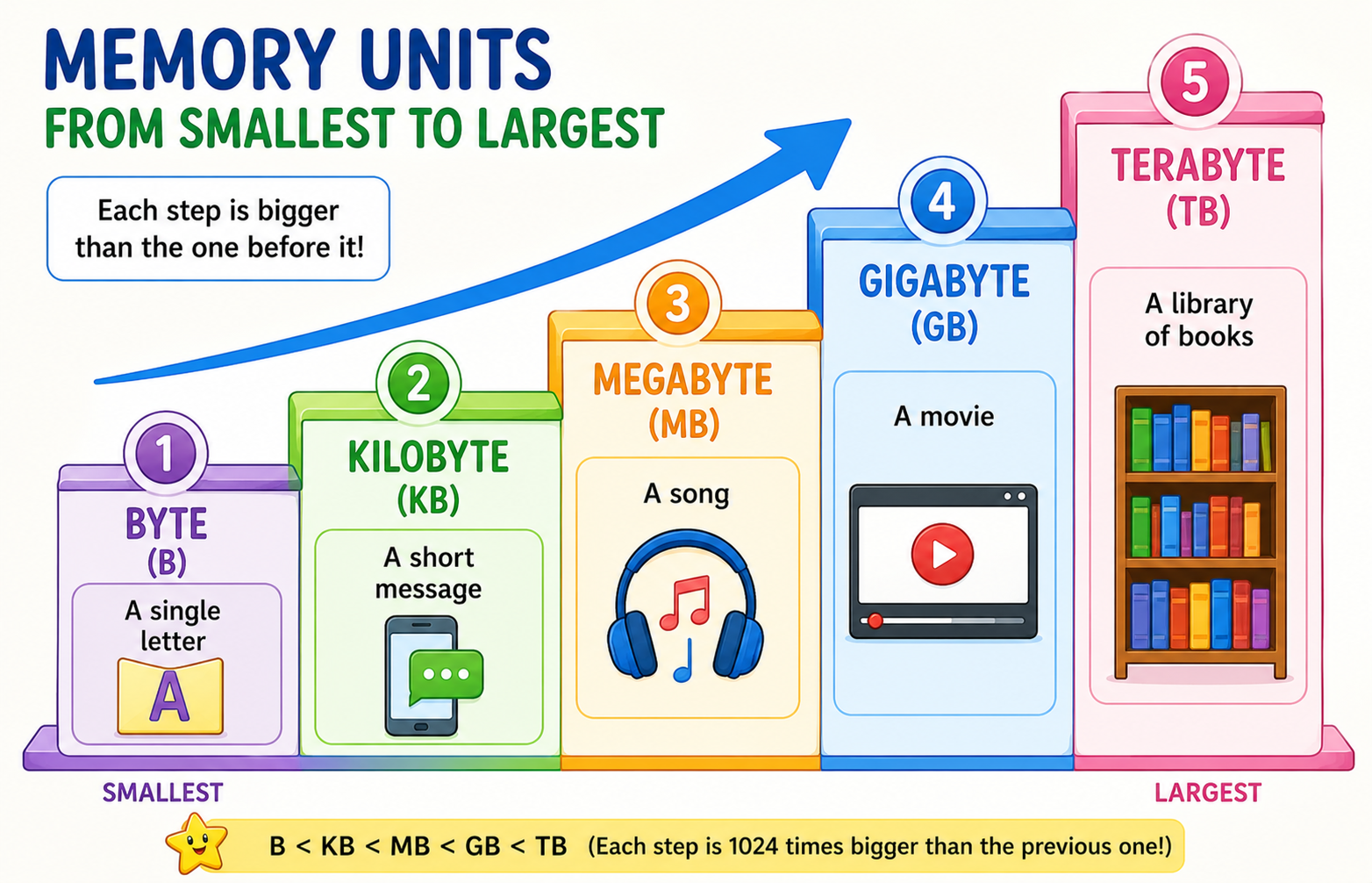
Computer memory is measured in special units. The smallest unit is a Byte. Larger units are Kilobyte (KB), Megabyte (MB), Gigabyte (GB), and Terabyte (TB).
Unit
Short Form
Size
Real-Life Comparison
Byte
B
1 letter or number
The letter "A" = 1 Byte
Kilobyte
KB
1024 Bytes
A short text message = about 2 KB
Megabyte
MB
1024 KB
1 song (MP3) = about 5 MB
Gigabyte
GB
1024 MB
1 movie = about 1-2 GB
Terabyte
TB
1024 GB
A big library of 500+ movies = 1 TB
Real-Life Examples for Indian Students
📱 A photo taken on a mobile phone = about 3-5 MB
🎵 One Bollywood song (MP3) = about 5 MB
📄 A one-page typed document = about 20 KB
🎬 One Hindi movie (HD) = about 1.5 GB
🎮 A mobile game = about 100-500 MB
💻 Ravi's computer has 8 GB RAM and 512 GB storage
Remember the order: B → KB → MB → GB → TB. Each step is about 1000 times bigger than the previous one (exactly 1024 times). Think of it like: a drop of water → a glass → a bucket → a tank → a swimming pool!
Internal Storage vs External Storage
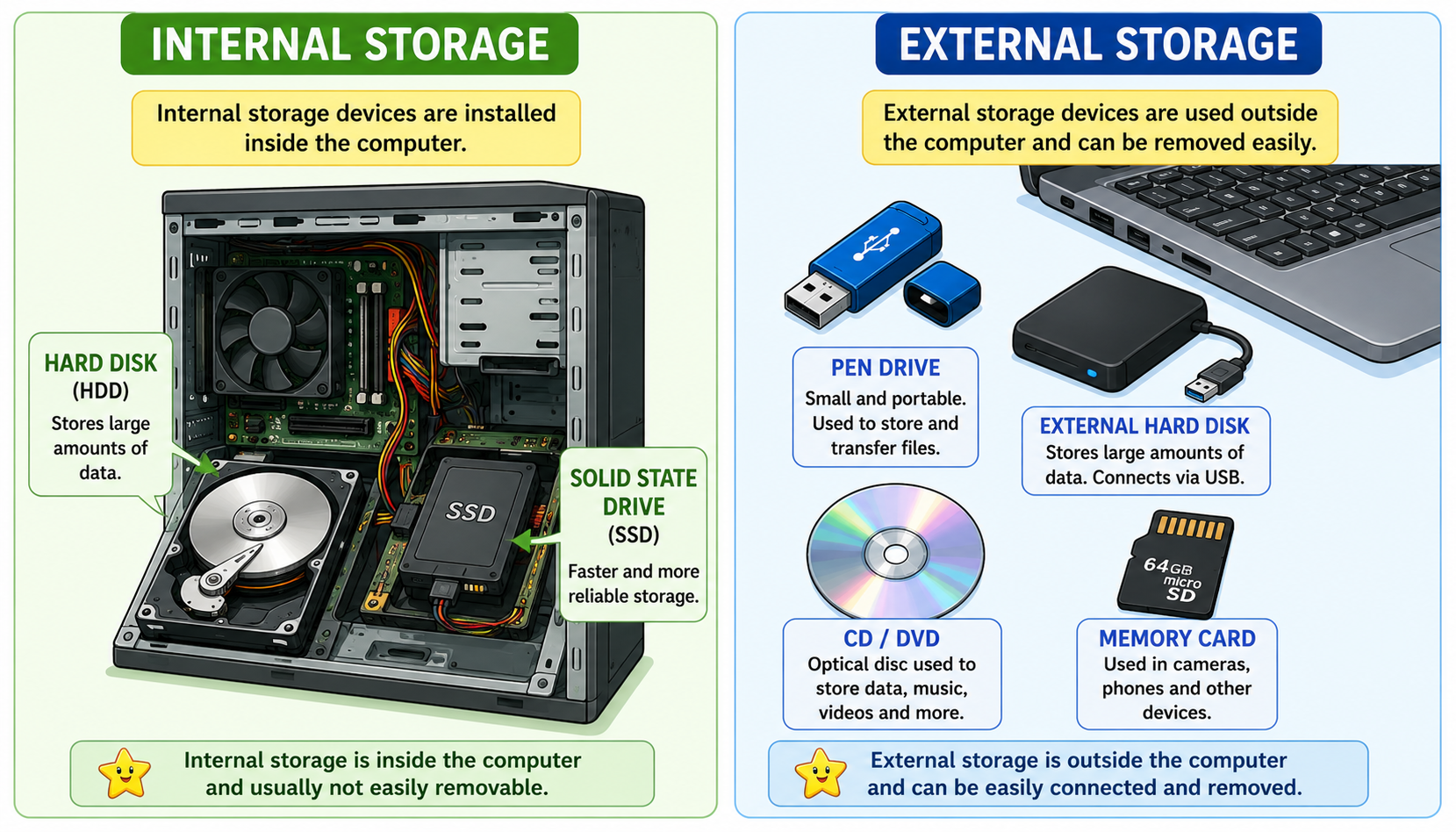
Storage devices can be inside the computer (internal) or outside the computer (external).
Internal Storage
Internal storage is built inside the computer. You cannot easily remove it. It stores the operating system, all your programs, and your saved files.
Hard Disk Drive (HDD) — A spinning disc inside the computer that stores large amounts of data.
Solid State Drive (SSD) — A newer, faster storage device with no moving parts. Many new laptops use SSDs.
External Storage
External storage devices can be connected to the computer from outside and removed when not needed. They are used to carry files from one computer to another or to keep a backup.
Pen Drive (USB Flash Drive) — Small, portable, plugs into the USB port.
External Hard Disk — A larger portable storage device with more space.
CD / DVD — Flat round discs that store music, movies, or software.
Memory Card (SD Card) — Tiny card used in phones, cameras, and tablets.
Feature
Internal Storage
External Storage
Location
Inside the computer
Outside, can be removed
Can you carry it?
No (fixed inside)
Yes (portable)
Examples
Hard Disk (HDD), SSD
Pen Drive, CD/DVD, Memory Card
Capacity
Very large (256 GB to 2 TB)
Smaller (4 GB to 256 GB usually)
Use
Stores OS, programs, all files
Backup, sharing files between computers
Example
Ravi's school computer has a 500 GB hard disk inside (internal storage). When he finishes his project, he copies it to a 16 GB pen drive (external storage) and takes it home. At home, he plugs the pen drive into his father's laptop and shows his project. External storage helps him carry files easily!
📝 Key Words
Word
Meaning
Memory
The space inside a computer where it stores data and instructions
RAM
Random Access Memory — temporary, fast memory that is lost when power is off
ROM
Read Only Memory — permanent memory that stays even when power is off
Storage
A place to save data permanently for later use
Byte
The smallest unit of computer memory (stores one character)
Kilobyte (KB)
1024 Bytes — about the size of a short text message
Megabyte (MB)
1024 KB — about the size of one song
Gigabyte (GB)
1024 MB — about the size of one movie
Hard Disk
Internal storage device that stores all files and programs
Pen Drive
A small external storage device that plugs into the USB port
⭐ Key Points to Remember
Computer memory is where the computer stores data and instructions.
RAM is temporary memory — data is lost when the computer is turned off.
ROM is permanent memory — data stays even when the computer is off.
RAM is fast and stores programs currently in use. ROM stores startup instructions.
Memory (RAM) is like a study table; Storage (Hard Disk) is like a bookshelf.
Memory units from smallest to largest: Byte → KB → MB → GB → TB.
1 song ≈ 5 MB, 1 movie ≈ 1.5 GB, 1 photo ≈ 3-5 MB.
Internal storage (HDD, SSD) is inside the computer; External storage (pen drive, CD) can be carried.
Finished learning? Now test what you know!
🎯 Quick Quiz — Test Yourself!
Answer these questions right here. You get instant feedback — no paper needed!
Score: 0 / 8
1. The part of a computer that remembers information is called:
Computer memory helps the computer store and recall information.
2. Which type of memory is temporary and forgets everything when the computer is switched off?
RAM is temporary memory — it loses its data when the computer is turned off.
3. Which type of memory is permanent and does not get erased when the power is off?
ROM is permanent memory — its data stays even when the power is off.
4. Which is the smallest unit of computer memory listed here?
Order from small to big: Byte, KB, MB, GB. The byte is the smallest here.
5. Which memory is the computer's "working" temporary memory? (3 letters)
RAM (Random Access Memory) is the temporary working memory.
6. Which memory keeps its data permanently even without power? (3 letters)
ROM (Read Only Memory) stores data permanently.
7. Which of these is an external storage device you can carry?
A pen drive is an external storage device you can carry in your pocket.
8. Which unit is bigger: MB or GB? (write the bigger one)
GB (gigabyte) is bigger than MB (megabyte). 1 GB = about 1000 MB.
✏️ Practice Questions
A. Fill in the Blanks
1. RAM stands for .
2. ROM stands for .
3. Data in RAM is when the computer is turned off.
4. The smallest unit of computer memory is called a .
5. 1024 Bytes make one .
6. A is a small external storage device that plugs into the USB port.
7. ROM stores the instructions of the computer.
8. One MP3 song takes about MB of space.
9. The hard disk is an example of storage.
10. RAM is than ROM in speed.
B. Multiple Choice Questions
1. Which memory loses its data when the computer is turned off?
(a) ROM(b) RAM(c) Hard Disk(d) Pen Drive
2. Meena wants to carry her school project from school to home. Which device should she use?
1. What is computer memory? Why does a computer need it?
2. What is the difference between RAM and ROM?
3. What happens to the data in RAM when the computer is switched off?
4. Name two internal storage devices and two external storage devices.
5. Write the memory units in order from smallest to largest.
D. True or False
1. RAM is permanent memory.
2. ROM stores the startup instructions of the computer.
3. A pen drive is an internal storage device.
4. 1 GB is bigger than 1 MB.
5. Data in ROM is lost when the computer is turned off.
E. Match the Following
Column A
Column B
1. RAM
(a) Permanent memory with startup instructions
2. ROM
(b) Smallest unit of memory
3. Byte
(c) External storage device
4. Pen Drive
(d) Temporary, fast memory
5. Hard Disk
(e) Internal storage device
🎨 Memory Detective!
Look at the items below. Write whether each one is stored in RAM, ROM, or Storage (Hard Disk/Pen Drive).
Items:
A game you are currently playing —
The computer's startup instructions —
Your saved holiday photos —
A document you are typing right now —
Songs saved on a pen drive —
Bonus: Ask your parents how much RAM and storage your home computer or phone has. Write it in your notebook!
Want to review the lesson again?
Computer
Computer Memory
Class 3 | CBSE / NCERT / ICSE
Name: Class / Sec: Date:
🎯 Learning Objectives
Understand what computer memory is and why it is needed.
Learn the two main types of memory: RAM and ROM.
Understand the difference between RAM (temporary) and ROM (permanent).
Know the difference between memory and storage.
Learn the units of memory: Byte, KB, MB, GB with real-life comparisons.
Understand internal storage vs external storage with examples.
📖 Let Us Begin!
Just like our brain helps us think and remember, computer memory helps the computer store and recall data. Without memory, a computer cannot work — it would forget everything instantly!
Computer memory is the space inside a computer where it keeps data and instructions. Think of it like a notebook where the computer writes down everything it needs to remember.
Types of Computer Memory
1. RAM (Random Access Memory) — The computer's short-term memory.
RAM is temporary — data is lost when the computer is turned off.
RAM is very fast — it helps the computer work quickly.
RAM stores the programs and files you are currently using.
More RAM = computer can run more programs at the same time.
Example: When Meena opens a drawing app, it is loaded into RAM. If power goes off before she saves, her drawing is lost!
2. ROM (Read Only Memory) — The computer's permanent memory.
ROM is permanent — data stays even when the computer is off.
ROM can only be read, not easily changed.
ROM stores the startup instructions (BIOS) for the computer.
ROM is slower than RAM but never loses its data.
Example: When Ravi presses the power button, the computer knows what to do because startup instructions are stored in ROM.
Feature
RAM
ROM
Full Form
Random Access Memory
Read Only Memory
Type
Temporary (volatile)
Permanent (non-volatile)
When power is OFF
Data is lost
Data stays
Speed
Very fast
Slower than RAM
Can we change data?
Yes, easily
No, read-only
What it stores
Programs currently in use
Startup instructions (BIOS)
Comparison
Like a whiteboard — write & erase
Like a printed book — cannot change
RAM is like a whiteboard — the teacher writes and erases every day. ROM is like a printed textbook — the words stay forever!
Computer
Computer Memory (continued)
Class 3 | CBSE / NCERT / ICSE
Name: Class / Sec: Date:
Storage vs Memory — What's the Difference?
Memory (RAM)
Storage (Hard Disk / SSD)
Short-term — holds data while computer is ON
Long-term — keeps data even when computer is OFF
Very fast
Slower than RAM
Small capacity (4 GB, 8 GB)
Large capacity (256 GB, 500 GB, 1 TB)
Like your study table (books you're reading now)
Like your bookshelf (all your books)
Memory (RAM) = study table (limited space, current work). Storage = bookshelf (lots of space, all books).
Units of Computer Memory
Unit
Short Form
Size
Real-Life Comparison
Byte
B
1 letter or number
The letter "A" = 1 Byte
Kilobyte
KB
1024 Bytes
A short text message ≈ 2 KB
Megabyte
MB
1024 KB
1 song (MP3) ≈ 5 MB
Gigabyte
GB
1024 MB
1 movie ≈ 1-2 GB
Terabyte
TB
1024 GB
500+ movies = 1 TB
Real-Life Examples: 📱 Photo = 3-5 MB | 🎵 Bollywood song = 5 MB | 📄 Document = 20 KB | 🎬 Hindi movie (HD) = 1.5 GB | 🎮 Mobile game = 100-500 MB
Internal Storage vs External Storage
Feature
Internal Storage
External Storage
Location
Inside the computer
Outside, can be removed
Can you carry it?
No (fixed inside)
Yes (portable)
Examples
Hard Disk (HDD), SSD
Pen Drive, CD/DVD, Memory Card
Capacity
Very large (256 GB to 2 TB)
Smaller (4 GB to 256 GB usually)
Use
Stores OS, programs, all files
Backup, sharing files
📝 Key Words
Word
Meaning
Memory
Space inside a computer where it stores data and instructions
RAM
Random Access Memory — temporary, fast, lost when power is off
ROM
Read Only Memory — permanent, stays when power is off
Storage
A place to save data permanently for later use
Byte
Smallest unit of memory (stores one character)
Kilobyte (KB)
1024 Bytes
Megabyte (MB)
1024 KB
Gigabyte (GB)
1024 MB
Hard Disk
Internal storage for all files and programs
Pen Drive
Small external storage device (USB port)
⭐ Key Points to Remember
Computer memory is where the computer stores data and instructions.
RAM is temporary — data is lost when the computer is turned off.
ROM is permanent — data stays even when the computer is off.
RAM is fast and stores programs currently in use. ROM stores startup instructions.
Memory (RAM) is like a study table; Storage (Hard Disk) is like a bookshelf.
Memory units: Byte → KB → MB → GB → TB (each is 1024× the previous).
1 song ≈ 5 MB, 1 movie ≈ 1.5 GB, 1 photo ≈ 3-5 MB.
Internal storage (HDD, SSD) is inside; External storage (pen drive, CD) can be carried.
Computer
Computer Memory — Practice Questions
Class 3
Name: Class / Sec: Date:
A. Fill in the Blanks
1. RAM stands for .
2. ROM stands for .
3. Data in RAM is when the computer is turned off.
4. The smallest unit of computer memory is called a .
5. 1024 Bytes make one .
6. A is a small external storage device that plugs into the USB port.
7. ROM stores the instructions of the computer.
8. One MP3 song takes about MB of space.
9. The hard disk is an example of storage.
10. RAM is than ROM in speed.
B. Multiple Choice Questions
1. Which memory loses its data when the computer is turned off?
(a) ROM(b) RAM(c) Hard Disk(d) Pen Drive
2. Meena wants to carry her school project from school to home. Which device should she use?